
Lunify Music
Музыка прямо в Minecraft. Управляй радио сервера с пульта, слушай его в наушниках в полном качестве, включай Яндекс Музыку, SoundCloud или свои файлы. Текст песни поёт вместе с тобой: караоке на экране и слова, которые летают по миру.
Music right inside Minecraft. Control the server's radios from a remote, listen to them in your headphones in full quality, or play Yandex Music, SoundCloud and your own files. Lyrics sing along with you: on-screen karaoke and words that fly around the world.
Экран игры с модомYour screen with the mod
Живой макет: так HUD мода ложится поверх игры. Песня и текст придуманы для примера.
A live mock-up of how the mod's HUD sits on top of the game. The song and lyrics are made up for the demo.
Всё про музыку в одном модеEverything music, in one mod
Мод клиентский: ставится только тебе. Плеер работает на любом сервере и даже в главном меню, а радио — на сервере Lunify.
Client-side only: you install it just for yourself. The player works on any server and even in the main menu; the radio features work on the Lunify server.
Пульт Lunify РадиоLunify Radio remote только на LunifyLunify server
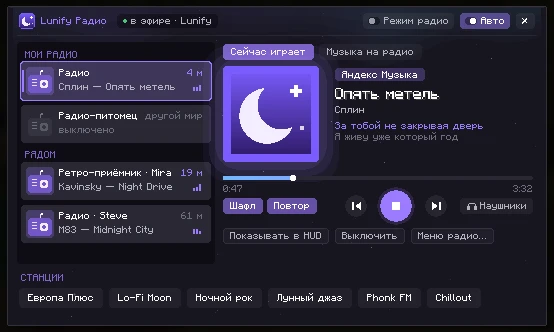
Все твои радио и те, что играют рядом, в одном окне. Видно, что играет и на каком расстоянии. Можно переключить станцию, поставить трек из Яндекс Музыки или по ссылке, перемотать, включить шафл и повтор, не подходя к самому радио.
All your radios and the ones playing nearby in a single window, with what's playing and how far away. Switch stations, queue a Yandex Music track or a link, seek, shuffle and repeat without walking up to the radio.
Радио в наушникахRadio in headphones
Мод сам играет радио в полном качестве, без сжатия голосового чата. Радио в мире для тебя замолкает, чтобы не было эха.
The mod plays the radio itself in full quality, without voice-chat compression. The in-world radio goes quiet for you, so there's no echo.
Яндекс МузыкаYandex Music
Поиск, «Мне нравится», «Моя волна» и станции, артисты, альбомы, плейлисты, лайки. Вход по короткому коду.
Search, liked tracks, "My Wave" and its stations, artists, albums, playlists and likes. Sign in with a short code.
SoundCloud
Ищи и слушай сразу, без аккаунта. Профиль можно привязать, чтобы видеть свои лайки.
Search and listen right away, no account needed. Link your profile to see your likes.
Свои файлыYour own files
mp3, flac, ogg, m4a и wav с компьютера. Перетащи папку в окно плеера, теги и обложки подтянутся сами. Сеть не нужна.
mp3, flac, ogg, m4a and wav from your PC. Drag a folder into the player; tags and covers are picked up automatically. Works offline.
КараокеKaraoke
Текст песни на экране с подсветкой строк, а где есть пословные тайминги — каждого слова.
On-screen lyrics that highlight line by line, or word by word where timings exist.
Летающий текстFlying lyrics
Слова песни появляются в мире перед тобой: вылетают, падают на блоки, рассыпаются. Анимации и цвета настраиваются.
Lyrics appear in the world in front of you: they fly in, drop onto blocks and shatter. Animations and colours are configurable.
Свой HUDCustom HUD
Карточка трека с обложкой, громкость, текст и визуализатор. Всё перетаскивается мышкой в редакторе.
Track card with cover, volume, lyrics and visualizer. Drag everything around in the editor.
ВизуализаторVisualizer
Столбики, блоки, зеркало или волна, которые прыгают под реальный звук. Цвета и чувствительность на выбор.
Bars, blocks, mirror or wave, driven by the actual audio. Pick colours and sensitivity.
КинокамераCinematic camera
Интерфейс уезжает, камера облетает персонажа с разных ракурсов и склеивает кадры в ритм музыки.
The UI slides away and the camera circles your character from different angles, cutting to the beat.
Discord и SpotifyDiscord & Spotify
Друзья в Discord видят, что ты слушаешь. А с Premium-аккаунтом Spotify мод управляет его приложением и показывает трек в HUD.
Friends on Discord see what you're listening to. With Spotify Premium, the mod controls the Spotify app and shows the track in the HUD.
Уйди от радио — музыка останетсяWalk away, keep the music
Обычно радио на сервере звучит через голосовой чат вокруг устройства: чем дальше отходишь, тем тише, а потом не слышно совсем. Кнопка «Наушники» переключает радио на сам мод: тот же трек с того же места, в полном качестве и на любом расстоянии.
Normally a server radio plays through voice chat around the device: the further you go, the quieter it gets, until it's gone. The Headphones button hands the radio over to the mod: same track, same position, full quality, any distance.
Двигай ползунок и сравни.
Move the slider to compare.
Настройки, которые видноSettings you can see
✨ Летающий текст✨ Flying lyrics
Клавиша J. Слова песни появляются в мире перед тобой и уходят красиво. В моде есть анимации появления Fly, Rise, Drop, Pop, Wave, Type, Spin, Glitch, разные уходы, цвета и свечение. Выбери и посмотри:
Press J. Lyrics appear in the world in front of you and leave in style. The mod has Fly, Rise, Drop, Pop, Wave, Type, Spin and Glitch entrances, several exits, colours and glow. Pick one:
📊 Визуализатор📊 Visualizer
Блок в HUD, который прыгает под звук. Четыре стиля, цвета, пики и чувствительность. Здесь звук сгенерирован, в игре — настоящий.
A HUD block that dances to the audio. Four styles, colours, peaks and sensitivity. Here the sound is simulated; in game it's real.
🖼️ Редактор HUD🖼️ HUD editor
Клавиша K → редактор. Карточка, текст, громкость и визуализатор двигаются мышкой куда угодно. Попробуй потаскать блоки прямо тут.
Press K → editor. Drag the card, lyrics, volume and visualizer anywhere. Try dragging the blocks right here.
Лунный светMoonlightLunify
🎬 Кинокамера🎬 Cinematic camera
Встань и нажми O: интерфейс уедет, появятся полосы, а камера начнёт снимать тебя с разных ракурсов и резать кадры под музыку. Пошёл — режим выключился.
Stand still and press O: the UI slides away, letterbox bars appear and the camera films you from changing angles, cutting to the music. Start walking to exit.
Поставить за пару минутUp and running in minutes
Fabric
Поставь Fabric Loader для Minecraft 26.2 (с fabricmc.net или прямо в своём лаунчере).
Install Fabric Loader for Minecraft 26.2 (from fabricmc.net or in your launcher).
Fabric API
Скачай Fabric API под 26.2 — без него мод не запустится.
Get Fabric API for 26.2 — the mod needs it.
МодThe mod
Скачай jar-файл и положи в папку
modsрядом с Fabric API.Download the jar file and drop it into
modsnext to Fabric API.ИграйPlay
Запусти игру профилем Fabric и нажми M. Плеер сам покажет короткую инструкцию.
Launch the Fabric profile and press M. The player shows a short tutorial on first open.
Управление без мышкиControl without the mouse
Все клавиши есть даже на компактной клавиатуре. Работают в игре, в окне плеера, в главном меню и в меню паузы. Наведи на подсвеченную клавишу. Поменять: настройки мода → «Клавиши» или «Управление» → «Lunify Music».
Every key exists even on compact keyboards. They work in game, in the player, in the main menu and the pause menu. Hover a highlighted key. Rebind in the mod settings → Keys, or in Controls → Lunify Music.
Как что сделатьHow to
📻Пульт радио: управлять радио на сервереRadio remote: control radios on the server
- Зайди на Lunify и нажми N. Слева появятся «Мои радио» и радио «Рядом» с расстоянием до них.
- Кликни по радио. Справа видно, что на нём играет: трек, текст и прогресс.
- Внизу — «Станции»: клик по станции сразу настраивает на неё выбранное радио.
- Вкладка «Музыка на радио»: найди трек в Яндекс Музыке или на SoundCloud, нажми Enter и кликни по треку — он заиграет на радио. Там же «Мне нравится», «Моя волна» и трек по ссылке (mp3, радиопоток, YouTube, SoundCloud).
- Кнопки под обложкой: шафл, повтор, назад/вперёд, стоп, «Наушники», «Показывать в HUD» и «Выключить».
- Join Lunify and press N. On the left you'll see My radios and radios Nearby with their distance.
- Click a radio. The right side shows what's playing: track, lyrics and progress.
- At the bottom are Stations: click one to tune the selected radio to it.
- The Music on radio tab: search Yandex Music or SoundCloud, press Enter and click a track to play it on the radio. Liked tracks, My Wave and play-by-link (mp3, radio stream, YouTube, SoundCloud) are there too.
- Buttons under the cover: shuffle, repeat, prev/next, stop, Headphones, Show in HUD and Turn off.
Включать музыку и переключать станции может только владелец радио. Чужие радио рядом можно слушать и смотреть, что играет.
Only the radio's owner can change the music or station. You can still listen to other players' radios and see what's on.
🎧Слушать радио в наушникахListen to a radio in headphones
- Открой пульт N и выбери радио.
- Нажми «Наушники». Радио в мире для тебя замолчит, а мод начнёт играть тот же трек с того же места.
- Отойди хоть на другой конец карты — музыка продолжит играть. Нажми «Наушники» ещё раз, чтобы выключить.
- Open the remote with N and pick a radio.
- Press Headphones. The in-world radio goes silent for you and the mod plays the same track from the same spot.
- Go to the other end of the map — the music keeps playing. Press Headphones again to stop.
В наушниках работают караоке, летающий текст и статус в Discord — всё как со своей музыкой.
Karaoke, flying lyrics and Discord status all work in headphones mode, just like with your own music.
🔗Привязать Яндекс Музыку к своему радиоLink Yandex Music to your radio
- Открой пульт N, выбери своё радио и вкладку «Музыка на радио».
- Нажми «Привязать — код придёт в чат». В чат игры придут код и ссылка.
- Открой ссылку, войди в Яндекс и введи код. Готово: на радио можно ставить треки, «Мне нравится» и «Мою волну».
- Open the remote with N, pick your radio and the Music on radio tab.
- Press Link — code comes to chat. A code and a link appear in game chat.
- Open the link, sign in to Yandex and enter the code. Done: you can play tracks, liked songs and My Wave on the radio.
Это аккаунт на сервере для радио — его слышат все вокруг. Он не связан со входом в Яндекс Музыку в плеере мода (M): та музыка играет только тебе. Подробнее: вики.
This is a server-side account for the radio — everyone around hears it. It's separate from signing in to Yandex in the mod player (M), which plays only to you.
🔀«Режим радио» и «Авто»: кто главный в HUD"Radio mode" and "Auto": who owns the HUD
- Авто — пока своя музыка не играет, HUD сам показывает ближайшее играющее радио: трек, текст и караоке.
- Режим радио — своя музыка мода молчит, а HUD и караоке всегда показывают радио. Удобно, когда сидишь у радио с друзьями.
- Включил свой трек в плеере — мод отпускает радио, чтобы не перебивать твою музыку.
- Auto — while your own music isn't playing, the HUD shows the nearest playing radio: track, lyrics and karaoke.
- Radio mode — the mod's own music stays silent and the HUD always shows the radio. Handy when hanging out at a radio with friends.
- Start your own track in the player and the mod lets go of the radio.
🎵Войти в Яндекс Музыку в плеереSign in to Yandex Music in the player
- Нажми M и выбери Яндекс Музыка.
- Нажми «Войти по коду». Откроется браузер на ya.ru/device, а код уже скопирован.
- Войди в аккаунт, вставь код (Ctrl+V) и нажми «Разрешить». Игра войдёт сама.
- Press M and choose Yandex Music.
- Press Sign in with code. Your browser opens ya.ru/device and the code is already copied.
- Sign in, paste the code (Ctrl+V) and press Allow. The game signs in by itself.
Под поиском есть вкладки Треки / Артисты / Альбомы / Плейлисты. Клик по альбому или плейлисту — список треков и «▶ Играть всё». Клик по имени артиста под обложкой открывает его страницу.
Under the search box are Tracks / Artists / Albums / Playlists tabs. Click an album or playlist for its tracks and "▶ Play all". Click the artist name under the cover to open their page.
Аккаунт сохранится — в следующий раз достаточно кликнуть по нему.
Your account is saved — next time just click it.
☁️SoundCloud
Поиск и прослушивание работают сразу. Чтобы видеть свои лайки, нажми «Войти в аккаунт» и вставь ссылку на профиль — soundcloud.com/имя, @имя или короткую ссылку из «Поделиться».
Search and playback work right away. To see your likes, press Sign in and paste your profile link — soundcloud.com/name, @name or a short share link.
Треки Go+ без подписки играют 30-секундным отрывком — так их отдаёт сам SoundCloud.
Go+ tracks without a subscription play as 30-second previews — that's how SoundCloud serves them.
📁Слушать свою музыку с компьютераPlay music from your computer
- Перетащи папку или файлы прямо в окно плеера — они добавятся в «Мои файлы» и запомнятся.
- Или положи музыку в папку
overtone-musicрядом с игрой (кнопка «Папка» откроет её). Новые файлы подхватятся при запуске или по кнопке «Обновить». - Убрать трек из списка: наведи и нажми Delete. С диска файл не удаляется.
- Drag a folder or files straight into the player window — they're added to My files and remembered.
- Or put music in the
overtone-musicfolder next to the game (the Folder button opens it). New files are picked up on launch or with Refresh. - Remove a track from the list: hover it and press Delete. The file stays on disk.
Хочешь караоке для своего трека? Положи рядом .lrc с тем же названием. Если его нет, мод поищет текст в интернете.
Want karaoke for your track? Put a .lrc file with the same name next to it. Otherwise the mod looks the lyrics up online.
🎤Караоке и тексты песенKaraoke and lyrics
Текст подтягивается сам: из Яндекс Музыки, из файла .lrc или из открытых баз текстов. Если не нашёлся сразу, мод попробует ещё несколько раз. Найденный текст сверяется с названием, исполнителем и длительностью — лучше пусто, чем чужая песня.
Lyrics are fetched automatically: from Yandex Music, an .lrc file or open lyrics databases. If nothing turns up, the mod retries a few times. Results are checked against title, artist and length — better empty than the wrong song.
Тексты из интернета выключаются в настройках → «Общие».
Online lyrics can be turned off in Settings → General.
🚪Музыка, если тебя кикнулоMusic after a disconnect
Плеер открывается и без мира: на M или кнопкой в левом верхнем углу главного меню, меню паузы и экрана «Вас отключили». Закрытие окна плеера музыку не останавливает.
The player opens without a world too: press M or use the button in the top-left of the main menu, pause menu and the disconnected screen. Closing the player doesn't stop the music.
Частые проблемыCommon problems
| Игра не запускается с модомGame won't start with the mod | Проверь, что стоят Fabric Loader и Fabric API именно под Minecraft 26.2 и что игра запущена профилем Fabric.Make sure Fabric Loader and Fabric API are for Minecraft 26.2 and you launched the Fabric profile. |
| Нет звукаNo sound | Проверь громкость в плеере и устройство вывода в его настройках («Авто» — как в настройках звука Minecraft). Если включено «Учитывать громкость игры», ползунки «Основная» и «Музыка» в Minecraft не должны быть на нуле.Check the player volume and output device in its settings ("Auto" follows Minecraft's sound settings). If "Respect game volume" is on, Minecraft's Master and Music sliders must not be at zero. |
| В пульте N пустоThe N remote is empty | Радио живёт на сервере Lunify: на других серверах и в одиночной игре пульт пуст. Своё радио нужно сначала поставить в мире — как его получить.Radios live on the Lunify server: on other servers and in singleplayer the remote is empty. On Lunify, place your own radio first. |
| «Управлять может только владелец»"Only the owner can control it" | Это чужое радио: его можно слушать и ставить в наушники, но не переключать.That's someone else's radio: you can listen and use headphones, but not change it. |
| Не входит в ЯндексYandex sign-in fails | Пользуйся входом по коду. Если код истёк — нажми «Войти по коду» ещё раз.Use code sign-in. If the code expired, press "Sign in with code" again. |
| Нет текста песниNo lyrics | Не у каждой песни есть текст в открытых базах. Для своих файлов положи рядом .lrc. Проверь, не выключены ли «Тексты из интернета».Not every song has lyrics in open databases. For local files add an .lrc. Check that online lyrics aren't turned off. |
| Клавиши не работаютKeys don't work | Скорее всего, та же клавиша занята другим модом. Поменяй её в «Управление» → «Lunify Music».Another mod probably uses the same key. Rebind it in Controls → Lunify Music. |
Не помогло? Пиши в Discord — поможем.
Still stuck? Ask on our Discord (Russian-speaking community).
Мод не шпионитNo tracking
Что с твоими даннымиYour data
- Никакой телеметрии и аналитики.
- Вход в Яндекс или SoundCloud уходит только на их серверы и хранится у тебя в папке игры. Никому не показывай
config/musicplayer.json. - Свои файлы никуда не загружаются: мод помнит только пути и теги.
- Статус в Discord получает только Discord на твоём компьютере.
- No telemetry, no analytics.
- Yandex or SoundCloud tokens go only to their servers and are stored in your game folder. Never share
config/musicplayer.json. - Local files are never uploaded: the mod stores only paths and tags.
- Discord status is sent only to the Discord app on your computer.
АвторыCredits
- Lunify Music сделан командой Lunify.
- Основа — открытый мод Overtone от chifir4ik и PabJlo (MIT).
- Идеи дизайна — SpotifyMusicMod от Kartonek (MIT).
- Сторонние компоненты перечислены внутри мода.
- Lunify Music is made by the Lunify team.
- Based on the open-source Overtone by chifir4ik and PabJlo (MIT).
- Design ideas from SpotifyMusicMod by Kartonek (MIT).
- Third-party components are listed inside the mod.
Включай музыкуPress play
Один файл в папку mods — и радио Lunify у тебя в кармане. А радио послушать можно на нашем сервере:
One file in your mods folder. Want the radio features? Join our server: